

Cookie Policy
This Cookie Policy (“Policy”) explains how ColdNavigator (referred to as “we”, “us”, or “our”) uses cookies and similar tracking technologies on our website coldnavigator.com and related online services (collectively, the “Service”).
This Policy should be read together with our Privacy Policy, which explains how we collect, use, and share personal information.
By using the Service, you consent to the use of cookies as described in this Policy.
1. What Are Cookies?
Cookies are small text files stored on your device (computer, tablet, mobile) when you visit a website.
Cookies help the website recognize your device and remember information about your visit.
Similar technologies include:
Web beacons
Pixel tags
Local storage
Throughout this Policy, we use the term “cookies” to refer to all such technologies.
2. How We Use Cookies
We use cookies for the following purposes:
a. Strictly Necessary Cookies
These cookies are essential for the Service to function.
They enable core features such as:
User login and authentication
Session management
Security controls
Without these cookies, the Service may not work properly.
b. Performance and Analytics Cookies
These cookies help us understand how users interact with the Service so we can improve performance and usability.
They collect information like:
Pages visited
Time spent on pages
Click patterns
This data is aggregated and anonymous.
c. Functional Cookies
These cookies allow the Service to remember choices you make, such as:
Language preferences
Display settings
This makes your experience more personalized.
d. Advertising and Tracking Cookies
We and our partners may use cookies to deliver relevant advertising or measure the effectiveness of ads.
These cookies may track your browsing across websites.
3. Third-Party Cookies
Third parties (such as analytics or advertising partners) may set cookies on our Service.
Examples include:
Google Analytics
Hotjar
Tag Managers
Third-party cookies are governed by the third party’s own privacy and cookie policies.
4. Your Choices About Cookies
a. Browser Controls
Most browsers allow you to manage cookies via settings.
You can:
Block cookies
Delete existing cookies
Opt out of specific cookie types
If you disable cookies, some features of the Service may not work.
b. Cookie Consent Banner
When you first visit the Service, you’ll see a cookie consent banner allowing you to:
Accept all cookies
Reject non-essential cookies
Your choices will be stored for future visits.
5. Cookies We Use
Here’s an example of the types of cookies we may use:

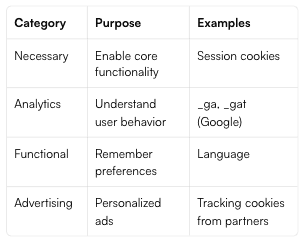
Please note that cookie names may vary depending on updates to third-party services.
6. How to Disable Cookies
You can manage or disable cookies through your browser settings.
Links for popular browsers:
Chrome: Settings → Privacy and security → Cookies
Firefox: Preferences → Privacy & Security → Cookies
Safari: Preferences → Privacy → Block cookies
Edge: Settings → Site permissions → Cookies
For detailed instructions, see your browser’s help documentation.
7. Do-Not-Track Signals
At this time, our Service does not respond to “Do Not Track” browser signals.
8. Changes to This Policy
We may update this Cookie Policy at any time.
We will post the updated version with a revised “Last Updated” date.
Your continued use of the Service after changes signifies acceptance of the revised Policy.
9. Contact Us
If you have questions about this Cookie Policy or our data practices, contact:
📧 support@coldnavigator.com
Best Practices for Implementation
1. Cookie Consent Banner
Include:
“Accept all”
“Reject non-essential”
“Cookie settings”
2. Categorize Cookies
Make sure users can opt out of:
Performance
Functional
Tracking/Advertising
3. Store User Preference
Store consent choice for at least 12 months.
4. Link This Policy
Footer link on every page:
Privacy Policy | Cookie Policy | Terms of Service